

Overview
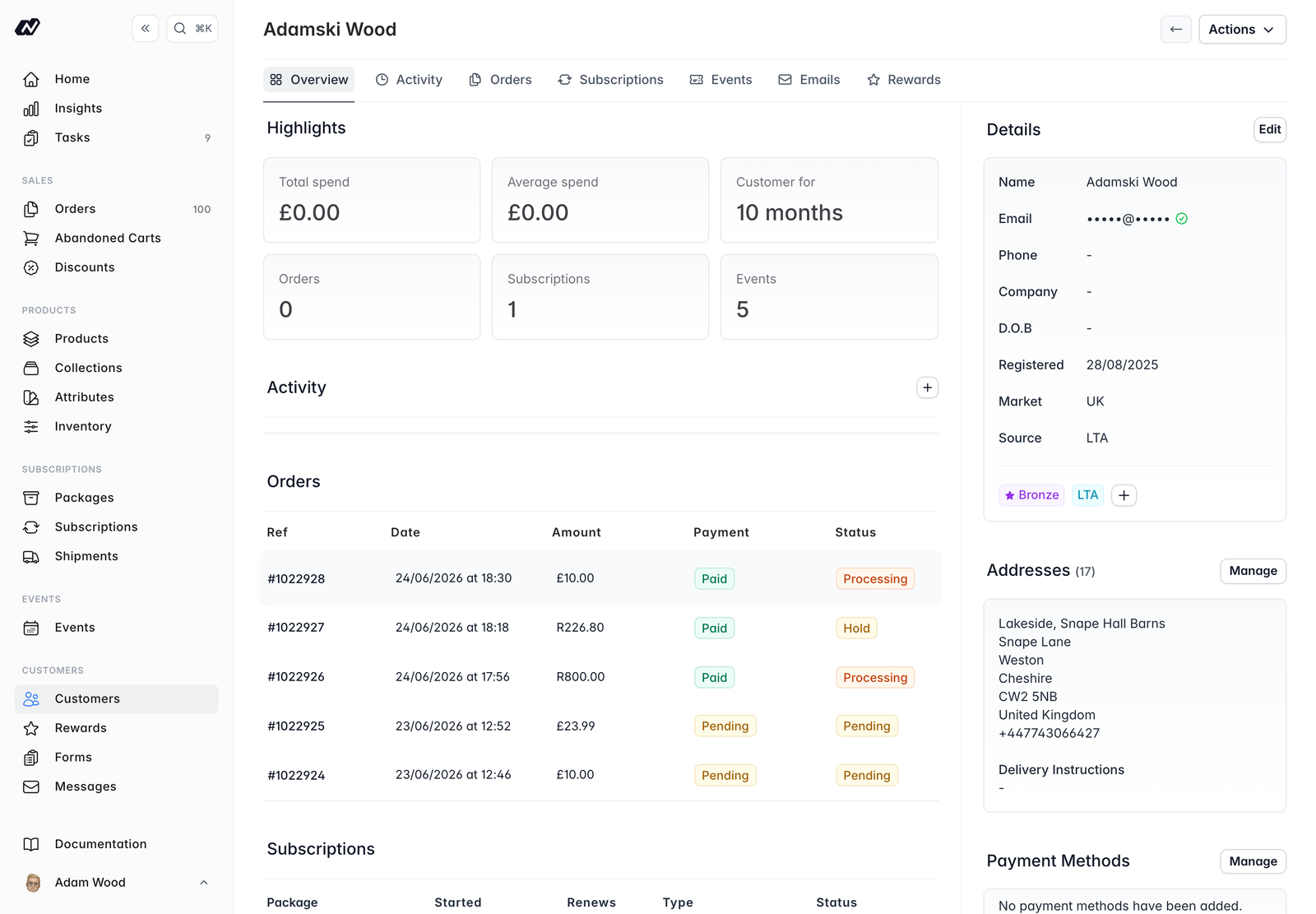
The Overview tab gives you an at-a-glance picture of the customer:- Highlight cards - total and average spend, how long they have been a customer for, and their number of orders, subscriptions and events
- Activity feed - a running history of the customer, including any notes you add. It updates automatically
- Latest orders and subscriptions - their most recent records
Activity
The full activity timeline for the customer, with the option to add a note.Orders, Subscriptions and Events
Each of these tabs lists the customer’s records of that type, so you can see everything they have ordered, subscribed to or attended.Emails
A record of every email sent to the customer, each with a delivery status:QueuedSentDeliveredBouncedSpamFailed
Rewards
When rewards are enabled, this tab shows the customer’s points and tier history. You can Adjust their points balance or set their tier directly from here. See Rewards.Panels
Alongside the tabs, the profile shows a set of panels you can manage.Details
Name, email (with a verified/email-status indicator), phone, company, date of birth, registered date, market, source and tags.Addresses
The customer’s saved addresses, along with any delivery instructions. You can add, edit and remove addresses, and set which one is the default.Payment methods
The customer’s saved cards, including which is the default. You can manage these from here.Mailing-list consent
Toggles for the customer’s marketing consent, so you can keep their preferences up to date.Rewards
When rewards are enabled, a block showing the customer’s tier, points and progress towards the next tier. See Rewards.Tags
Tags are free-form labels you can add to a customer to help you group and filter them. When rewards are enabled, the customer’s reward tier also appears as a tag.Actions
From a customer’s profile you can:- Edit details - update their name, contact details and other information
- Archive / Unarchive - archive a customer you no longer deal with, or restore them. Archiving can also unsubscribe them from all mailing lists
- Verify email - manually mark the customer’s email address as verified
- Manage addresses and payment methods
- Manage marketing consent
- Manage tags
- Adjust points or set tier - when rewards are enabled, from the Rewards tab
The customer’s type (
Direct or Wholesale) is set when the customer is created and cannot be changed from the profile.