

- Log in to your Marzipan account
- Navigate to Discounts in the main menu
- Click the Add discount button in the top-right corner
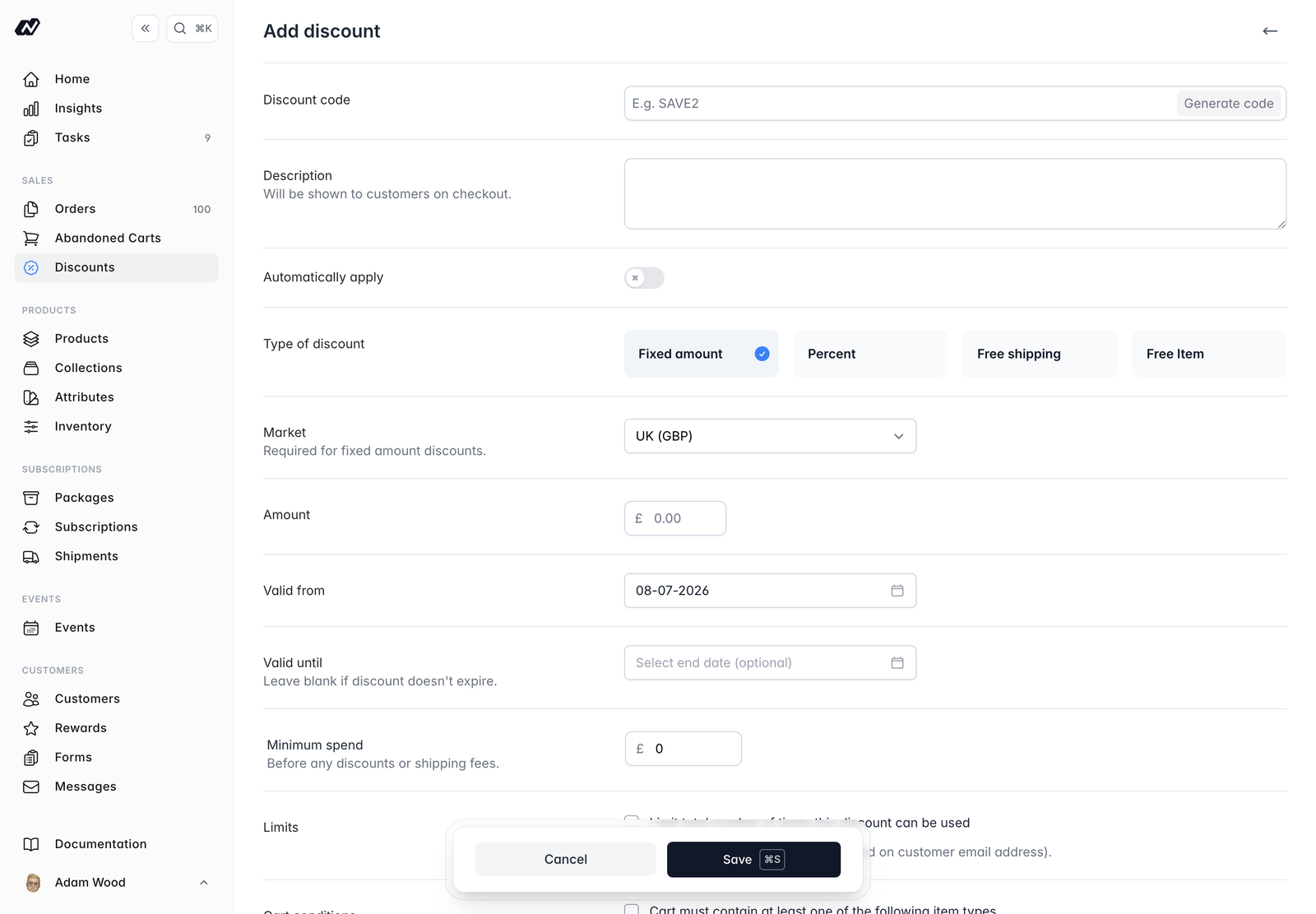
The basics
- Discount code - the code customers enter at checkout. Use Generate code to create one automatically.
- Description - a short description shown to the customer at checkout.
- Automatically apply - when enabled, the discount applies on its own without the customer needing to enter a code.
Type
Choose how the discount reduces the price:- Fixed amount - takes a set amount off the order.
- Percentage - takes a percentage off the order.
- Free shipping - removes shipping costs.
- Free item - adds a product to the order for free. Choose the product to add and set a label prefix (such as
FREE). - Cheapest item free - takes the cheapest qualifying item already in the cart off the total. One unit, not the whole line, so three bottles at £10 is £10 off.
Free item adds a product you nominate to the cart. Cheapest item free discounts something the customer has already chosen. The cheapest item is picked from the same set your product, product-type and pricing conditions already define, so a discount limited to a collection only ever gives away an item from it.
Market
For multi-market stores, choose the market the discount applies to. A market is required for fixed-amount discounts; for all other types it’s optional and the discount applies to all markets when left unset.A fixed amount is a sum of money, so it needs a market to tell it which currency to use. Percentage and free-shipping discounts work in any currency, so they don’t.
Validity
Set valid-from and valid-until dates to control when the discount is active. Leave a date blank for no start limit or no expiry.Minimum spend
Set a minimum spend the cart must reach for the discount to apply. This is measured before discounts and shipping.Limits
- A total usage limit caps how many times the discount can be used across all customers.
- A one-use-per-customer option limits each customer to a single use.
Conditions
Restrict when a discount applies:- The cart must reach a minimum number of items, for offers framed by count rather than value. Giveaway lines aren’t counted, so a free item can’t help satisfy the condition that produced it.
- The cart must contain a given item type (for example, a Subscription).
- The customer must have an active subscription, or one of certain tags.
- The discount applies only to specific products or product types (Physical, Bundle, Subscription, or Event).
- The discount applies only to certain shipping methods.
Pricing exclusions
Optionally stop a discount from stacking on already-reduced prices:- Don’t apply to sale pricing.
- Don’t apply to subscriber pricing.