> ## Documentation Index
> Fetch the complete documentation index at: https://docs.marzipan.co/llms.txt
> Use this file to discover all available pages before exploring further.
# Packages
> Create and edit the clubs and plans customers subscribe to
A **package** is the template a customer subscribes to — your club or plan. Create and edit packages to define what customers can subscribe to.
To view your packages:
1. Log in to your Marzipan account
2. Click on **Subscriptions** in the main navigation menu
3. Select **Packages**
 ## Creating and editing a package
When you create or edit a package you can set:
* **Name** — the package name shown to customers
* **Slug** — the URL-friendly identifier
* **Type** — `fixed`, `variable` or `picknmix`
* **Summary** and **Description** — short and long copy for the storefront
* **SKU** — the package's stock-keeping unit
* **Minimum items** — for pick & mix packages, the fewest items a customer must choose
* **Collections** — the collections the package belongs to
* **Availability** — when the package can be subscribed to
* **Status** — whether the package is `active`
For multi-market stores, **per-market pricing tabs** let you set prices for each market.
Choose the billing frequencies you want to allow, each expressed as every N months.
If you offer more than one frequency, set a **default** so customers start on your preferred cycle.
Renewal options control how and when subscriptions renew. See [Renewal options](#renewal-options) below.
Review the package and save it. Set the **Status** to `active` when you are ready for customers to subscribe.
## Renewal options
Renewal options control how and when subscriptions renew:
* **First-order cut-off window** — how long a customer has before their first renewal is due
* **Auto-renew** — renew subscriptions automatically
* **Requires shipping** — whether renewals need a shipping address
* **Grace period** — extra time allowed after a renewal is due
* **Free-renewal rule** — a builder for rules that grant a free renewal
* **Renewal reminder emails** — reminders sent 30, 21, 14, 7, 3 and 1 days before renewal
If a renewal payment fails, Marzipan retries it before cancelling the subscription. See [Failed renewals](/subscriptions/details#failed-renewals).
## Package metrics and tabs
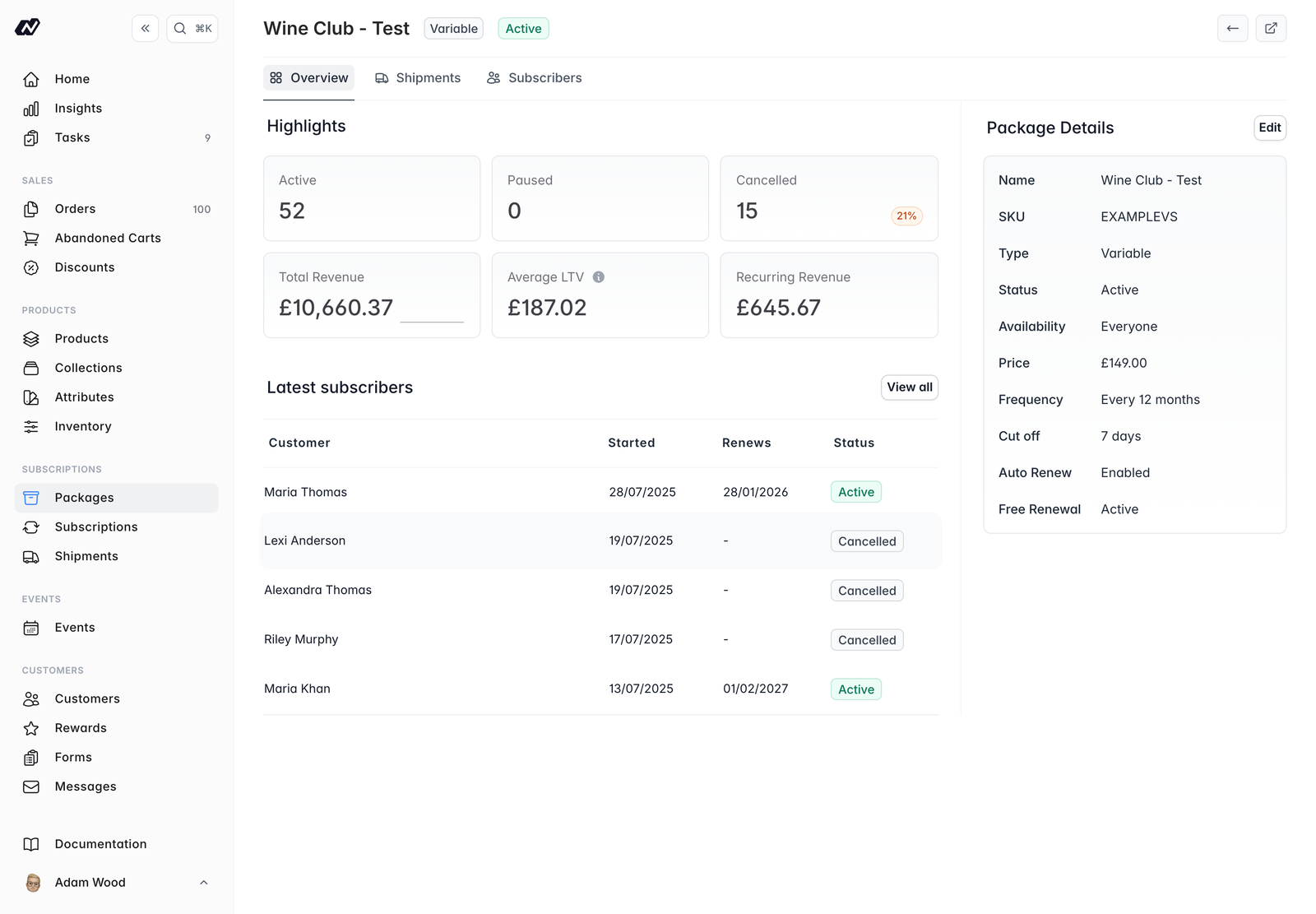
The package detail screen shows key metrics:
* Active, paused and cancelled counts
* Total revenue
* Average lifetime value (LTV)
* Monthly recurring revenue (MRR)
Depending on the package type, extra tabs are available:
* **Variable** packages have a **Shipments** tab for scheduling changing shipments. See [Shipments](/subscriptions/shipments).
* **Pick & Mix** packages have an **Available items** tab, where you set the default, minimum and maximum quantities per item.
### Available items
For pick & mix packages, the **Available items** tab is where you choose which items customers can pick from. For each item you set:
* The **default** quantity
* The **minimum** quantity
* The **maximum** quantity
## Creating and editing a package
When you create or edit a package you can set:
* **Name** — the package name shown to customers
* **Slug** — the URL-friendly identifier
* **Type** — `fixed`, `variable` or `picknmix`
* **Summary** and **Description** — short and long copy for the storefront
* **SKU** — the package's stock-keeping unit
* **Minimum items** — for pick & mix packages, the fewest items a customer must choose
* **Collections** — the collections the package belongs to
* **Availability** — when the package can be subscribed to
* **Status** — whether the package is `active`
For multi-market stores, **per-market pricing tabs** let you set prices for each market.
Choose the billing frequencies you want to allow, each expressed as every N months.
If you offer more than one frequency, set a **default** so customers start on your preferred cycle.
Renewal options control how and when subscriptions renew. See [Renewal options](#renewal-options) below.
Review the package and save it. Set the **Status** to `active` when you are ready for customers to subscribe.
## Renewal options
Renewal options control how and when subscriptions renew:
* **First-order cut-off window** — how long a customer has before their first renewal is due
* **Auto-renew** — renew subscriptions automatically
* **Requires shipping** — whether renewals need a shipping address
* **Grace period** — extra time allowed after a renewal is due
* **Free-renewal rule** — a builder for rules that grant a free renewal
* **Renewal reminder emails** — reminders sent 30, 21, 14, 7, 3 and 1 days before renewal
If a renewal payment fails, Marzipan retries it before cancelling the subscription. See [Failed renewals](/subscriptions/details#failed-renewals).
## Package metrics and tabs
The package detail screen shows key metrics:
* Active, paused and cancelled counts
* Total revenue
* Average lifetime value (LTV)
* Monthly recurring revenue (MRR)
Depending on the package type, extra tabs are available:
* **Variable** packages have a **Shipments** tab for scheduling changing shipments. See [Shipments](/subscriptions/shipments).
* **Pick & Mix** packages have an **Available items** tab, where you set the default, minimum and maximum quantities per item.
### Available items
For pick & mix packages, the **Available items** tab is where you choose which items customers can pick from. For each item you set:
* The **default** quantity
* The **minimum** quantity
* The **maximum** quantity