> ## Documentation Index
> Fetch the complete documentation index at: https://docs.marzipan.co/llms.txt
> Use this file to discover all available pages before exploring further.
# Payment links
> Send a customer a link to pay an order themselves, without handling their card details.
A payment link hands an order to the customer to pay. It suits an order you've taken over the phone, written up after a tasting, or built by hand. The customer settles it with their own card on a secure page, so you never take their details down yourself.
The customer pays the order you built, at the price you quoted, and it stays the same order with the same number throughout.
## Sending a link
Open the order and click **Send payment link**, in the same row as **Process payment** and **Mark as free**.
 The link is emailed to the customer straight away. You can set how long this particular link lasts as you send it, or let it take your [default expiry](#expiry).
A payment link can be sent on an order that is:
* A **draft**, or on **hold**
* Not yet paid
* Settled through **Stripe**
The payment page takes money through Stripe, so an order whose market settles through PayFast or PayPal isn't offered a link at the moment. Support for PayFast is planned. Where a market points at a provider you've since turned off, Marzipan falls back to your first active card provider.
## While a link is out
Once sent, the order shows the link itself, when it went and when it lapses, with **Resend link** and **Cancel link** beside it and a button to copy the address.
The link is emailed to the customer straight away. You can set how long this particular link lasts as you send it, or let it take your [default expiry](#expiry).
A payment link can be sent on an order that is:
* A **draft**, or on **hold**
* Not yet paid
* Settled through **Stripe**
The payment page takes money through Stripe, so an order whose market settles through PayFast or PayPal isn't offered a link at the moment. Support for PayFast is planned. Where a market points at a provider you've since turned off, Marzipan falls back to your first active card provider.
## While a link is out
Once sent, the order shows the link itself, when it went and when it lapses, with **Resend link** and **Cancel link** beside it and a button to copy the address.
 While a link is outstanding the order is locked: its **items can't be edited**, and **payment can't be taken another way**. That stops the customer paying for an order that has since moved, and stops the same order being paid twice.
### Resending
**Resend link** issues a fresh link and emails it again. The previous address stops working at that point, so only the most recent link a customer has is live.
### Cancelling
**Cancel link** hands the order back to you. The link stops working, and the order becomes an ordinary draft again: editable, and chargeable however you like.
Cancel the link first whenever you need to change an order a customer is holding.
## Expiry
A payment link is a standing invitation to charge a card at a price you quoted, so by default it doesn't last forever. Set your default under **Settings > Payments**:
* **1 day**, **3 days**, **7 days**, **14 days** or **30 days**
* **Never expires**
New stores start at 7 days. You can override the default for any individual send.
Prices and stock move. A link that never expires can be paid weeks later at a price you no longer offer.
An expired link leaves the order itself untouched. Only the link dies. The order shows a notice saying so, and **Payment link expired** is recorded in the order's activity, so a draft nobody paid can be told apart from one where the email never arrived. **Resend link** gives the customer a new one.
## The payment page
Payment links are served from Marzipan's own payment page rather than your storefront, so they work whatever your website is built with, or if you don't have one at all.
While a link is outstanding the order is locked: its **items can't be edited**, and **payment can't be taken another way**. That stops the customer paying for an order that has since moved, and stops the same order being paid twice.
### Resending
**Resend link** issues a fresh link and emails it again. The previous address stops working at that point, so only the most recent link a customer has is live.
### Cancelling
**Cancel link** hands the order back to you. The link stops working, and the order becomes an ordinary draft again: editable, and chargeable however you like.
Cancel the link first whenever you need to change an order a customer is holding.
## Expiry
A payment link is a standing invitation to charge a card at a price you quoted, so by default it doesn't last forever. Set your default under **Settings > Payments**:
* **1 day**, **3 days**, **7 days**, **14 days** or **30 days**
* **Never expires**
New stores start at 7 days. You can override the default for any individual send.
Prices and stock move. A link that never expires can be paid weeks later at a price you no longer offer.
An expired link leaves the order itself untouched. Only the link dies. The order shows a notice saying so, and **Payment link expired** is recorded in the order's activity, so a draft nobody paid can be told apart from one where the email never arrived. **Resend link** gives the customer a new one.
## The payment page
Payment links are served from Marzipan's own payment page rather than your storefront, so they work whatever your website is built with, or if you don't have one at all.
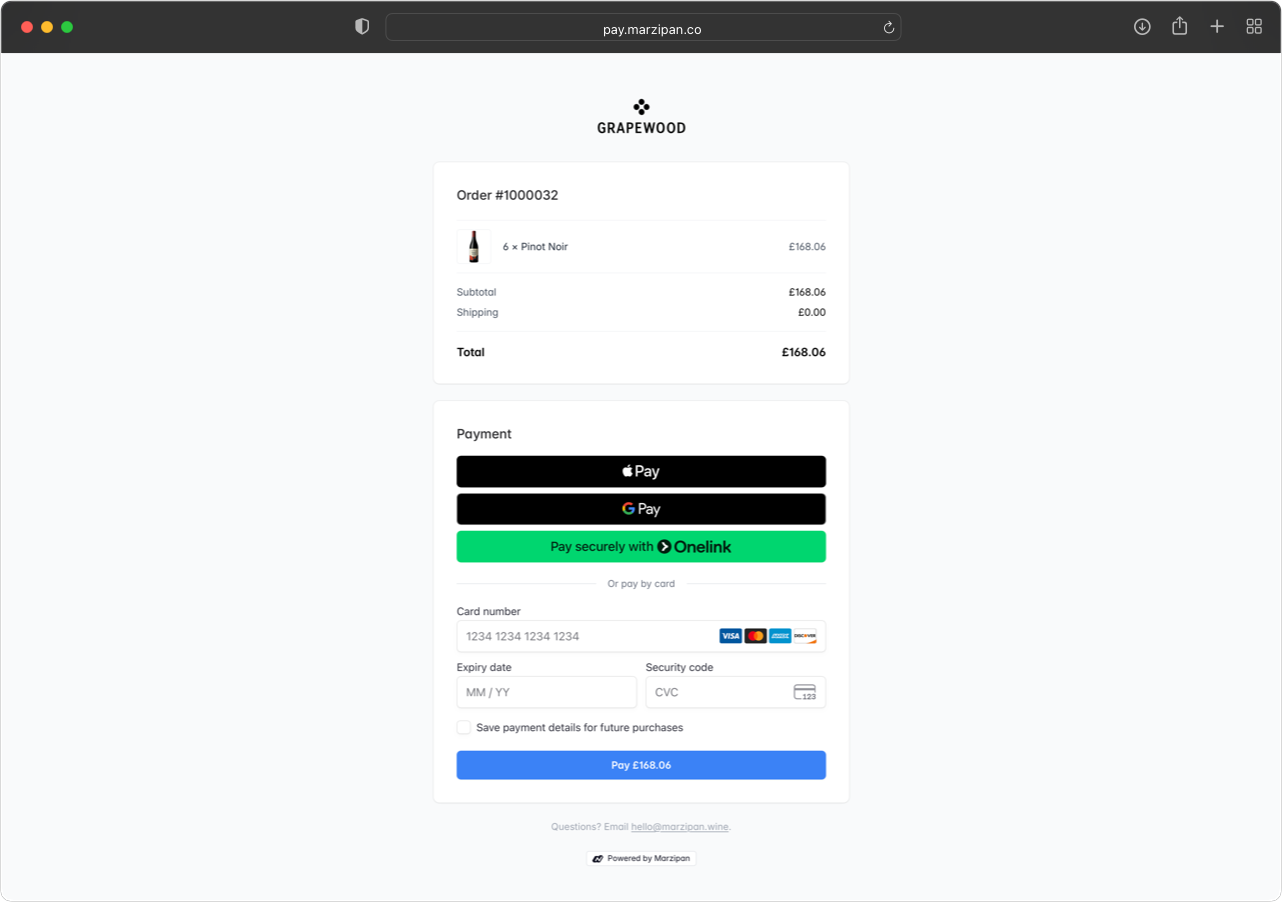 The page reads top to bottom: the order summary with product images, the delivery or collection details, the total, and then the payment form.
Each link has its own address, which changes every time you send. Anything else on that domain is a dead end, so an old or cancelled link stops working outright.
### Collection orders
An order being collected shows **where to collect from** instead of a delivery address, taken from the shipping method's [inventory location](/settings/inventory) and falling back to your store address. Any opening hours you've written into the shipping method's description are shown with it.
An order that needs no delivery at all shows neither.
### Payment methods
**Apple Pay** and **Google Pay** are offered as buttons above the card form, on the devices and browsers that support them: Safari shows Apple Pay, Chrome shows Google Pay. Where a device offers neither, the row doesn't appear at all rather than leaving a gap.
Beneath them the card form takes card payments. **Link** may also be offered, where Stripe judges the customer has an account.
Payment methods that would take the customer away to another site to pay aren't offered, since nothing on the page is set up to receive them back.
### Branding
The payment page picks up your **button colours** and **corner radius** from **Settings > Branding & Web Components**, so a store that has themed its shop gets a matching payment page without setting it up twice.
Backgrounds and text colours are deliberately left alone. This is a page people type card numbers into, and it needs to read as trustworthy above all.
## After payment
The order leaves draft and the payment is recorded against it like any other. The link stays live for a day afterwards so the customer can come back and check their payment landed, then retires itself.
Paying **doesn't release a hold**. An order held because something was oversold stays held once it's paid, so it can't drop into fulfilment with nothing to pick. Release it yourself when the stock is sorted.
## The email
The payment link email is your store writing to its own customer, so it carries your branding and can be reworded under **Settings > Notifications** alongside your other customer emails.
It includes the order summary and delivery details, so the customer can check the items, delivery method and address before paying rather than being asked to pay a figure.
The expiry sentence disappears by itself when a link never expires, so you can word it around the date without it trailing off.
## From the mobile app
Payment links can be sent and cancelled from the Marzipan mobile app as well as the web app, so you can hand an order over while you're with the customer.
The page reads top to bottom: the order summary with product images, the delivery or collection details, the total, and then the payment form.
Each link has its own address, which changes every time you send. Anything else on that domain is a dead end, so an old or cancelled link stops working outright.
### Collection orders
An order being collected shows **where to collect from** instead of a delivery address, taken from the shipping method's [inventory location](/settings/inventory) and falling back to your store address. Any opening hours you've written into the shipping method's description are shown with it.
An order that needs no delivery at all shows neither.
### Payment methods
**Apple Pay** and **Google Pay** are offered as buttons above the card form, on the devices and browsers that support them: Safari shows Apple Pay, Chrome shows Google Pay. Where a device offers neither, the row doesn't appear at all rather than leaving a gap.
Beneath them the card form takes card payments. **Link** may also be offered, where Stripe judges the customer has an account.
Payment methods that would take the customer away to another site to pay aren't offered, since nothing on the page is set up to receive them back.
### Branding
The payment page picks up your **button colours** and **corner radius** from **Settings > Branding & Web Components**, so a store that has themed its shop gets a matching payment page without setting it up twice.
Backgrounds and text colours are deliberately left alone. This is a page people type card numbers into, and it needs to read as trustworthy above all.
## After payment
The order leaves draft and the payment is recorded against it like any other. The link stays live for a day afterwards so the customer can come back and check their payment landed, then retires itself.
Paying **doesn't release a hold**. An order held because something was oversold stays held once it's paid, so it can't drop into fulfilment with nothing to pick. Release it yourself when the stock is sorted.
## The email
The payment link email is your store writing to its own customer, so it carries your branding and can be reworded under **Settings > Notifications** alongside your other customer emails.
It includes the order summary and delivery details, so the customer can check the items, delivery method and address before paying rather than being asked to pay a figure.
The expiry sentence disappears by itself when a link never expires, so you can word it around the date without it trailing off.
## From the mobile app
Payment links can be sent and cancelled from the Marzipan mobile app as well as the web app, so you can hand an order over while you're with the customer.