> ## Documentation Index
> Fetch the complete documentation index at: https://docs.marzipan.co/llms.txt
> Use this file to discover all available pages before exploring further.
# Details
> View and manage an individual customer
Opening a customer from the [customers list](/customers/overview) takes you to their profile. This is the full picture of one customer: who they are, what they have bought, what you have sent them, and where they stand in your loyalty programme.
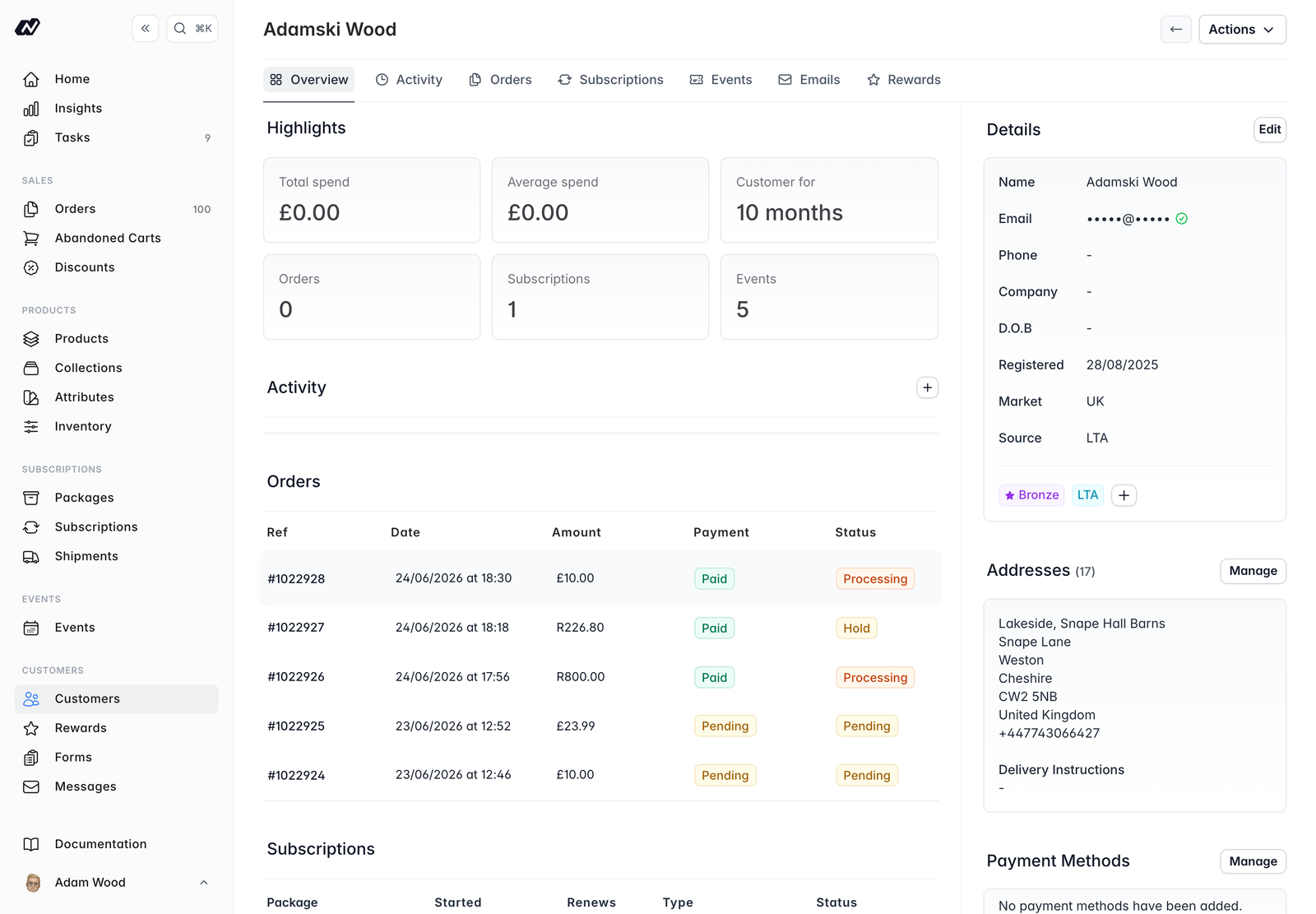 The profile is organised into tabs.
### Overview
The Overview tab gives you an at-a-glance picture of the customer:
* **Highlight cards** - total and average spend, how long they have been a customer for, and their number of orders, subscriptions and events
* **Activity feed** - a running history of the customer, including any notes you add. It updates automatically
* **Latest orders and subscriptions** - their most recent records
### Activity
The full activity timeline for the customer, with the option to add a note.
### Orders, Subscriptions and Events
Each of these tabs lists the customer's records of that type, so you can see everything they have ordered, subscribed to or attended.
### Emails
A record of every email sent to the customer, each with a delivery status:
* `Queued`
* `Sent`
* `Delivered`
* `Bounced`
* `Spam`
* `Failed`
Open any email to see its detail view.
### Rewards
When rewards are enabled, this tab shows the customer's points and tier history. You can **Adjust** their points balance or set their tier directly from here. See [Rewards](/rewards/overview).
## Panels
Alongside the tabs, the profile shows a set of panels you can manage.
### Details
Name, email (with a verified/email-status indicator), phone, company, date of birth, registered date, market, source and tags.
### Addresses
The customer's saved addresses, along with any delivery instructions. You can add, edit and remove addresses, and set which one is the default.
### Payment methods
The customer's saved cards, including which is the default. You can manage these from here.
### Mailing-list consent
Toggles for the customer's marketing consent, so you can keep their preferences up to date.
### Rewards
When rewards are enabled, a block showing the customer's tier, points and progress towards the next tier. See [Rewards](/rewards/overview).
### Tags
Tags are free-form labels you can add to a customer to help you group and filter them. When rewards are enabled, the customer's reward tier also appears as a tag.
## Actions
From a customer's profile you can:
* **Edit details** - update their name, contact details and other information
* **Archive / Unarchive** - archive a customer you no longer deal with, or restore them. Archiving can also unsubscribe them from all mailing lists
* **Verify email** - manually mark the customer's email address as verified
* **Manage addresses and payment methods**
* **Manage marketing consent**
* **Manage tags**
* **Adjust points or set tier** - when rewards are enabled, from the **Rewards** tab
The customer's **type** (`Direct` or `Wholesale`) is set when the customer is [created](/customers/create) and cannot be changed from the profile.
The profile is organised into tabs.
### Overview
The Overview tab gives you an at-a-glance picture of the customer:
* **Highlight cards** - total and average spend, how long they have been a customer for, and their number of orders, subscriptions and events
* **Activity feed** - a running history of the customer, including any notes you add. It updates automatically
* **Latest orders and subscriptions** - their most recent records
### Activity
The full activity timeline for the customer, with the option to add a note.
### Orders, Subscriptions and Events
Each of these tabs lists the customer's records of that type, so you can see everything they have ordered, subscribed to or attended.
### Emails
A record of every email sent to the customer, each with a delivery status:
* `Queued`
* `Sent`
* `Delivered`
* `Bounced`
* `Spam`
* `Failed`
Open any email to see its detail view.
### Rewards
When rewards are enabled, this tab shows the customer's points and tier history. You can **Adjust** their points balance or set their tier directly from here. See [Rewards](/rewards/overview).
## Panels
Alongside the tabs, the profile shows a set of panels you can manage.
### Details
Name, email (with a verified/email-status indicator), phone, company, date of birth, registered date, market, source and tags.
### Addresses
The customer's saved addresses, along with any delivery instructions. You can add, edit and remove addresses, and set which one is the default.
### Payment methods
The customer's saved cards, including which is the default. You can manage these from here.
### Mailing-list consent
Toggles for the customer's marketing consent, so you can keep their preferences up to date.
### Rewards
When rewards are enabled, a block showing the customer's tier, points and progress towards the next tier. See [Rewards](/rewards/overview).
### Tags
Tags are free-form labels you can add to a customer to help you group and filter them. When rewards are enabled, the customer's reward tier also appears as a tag.
## Actions
From a customer's profile you can:
* **Edit details** - update their name, contact details and other information
* **Archive / Unarchive** - archive a customer you no longer deal with, or restore them. Archiving can also unsubscribe them from all mailing lists
* **Verify email** - manually mark the customer's email address as verified
* **Manage addresses and payment methods**
* **Manage marketing consent**
* **Manage tags**
* **Adjust points or set tier** - when rewards are enabled, from the **Rewards** tab
The customer's **type** (`Direct` or `Wholesale`) is set when the customer is [created](/customers/create) and cannot be changed from the profile.